
The instruction layer your AI agents need
I keep our agent instructions in one repo and symlink AGENTS.md into each service. This is how that repo is laid out, why plans get deleted when the work ships, and what changed now that Claude Code reads AGENTS.md.
If your team uses AI coding agents, the instruction layer determines most of what you get out of them. Most teams start with a prompt or a note in a README and find the results uneven. This post walks through the structure I use across a product with many independent service repos.
With good instructions, agents follow conventions without reminders and reviews run against the same checklist every time. New engineers benefit too, since they can read the same docs to get oriented.
One principle first: context has a lifespan
Some information is stable for years. How you handle auth, what your commit format looks like, which ORM you use, how errors are shaped across the API. This context belongs in your instruction layer permanently.
Other information is temporary. Which features are actively being built, what a specific flow should do before it ships, what the current sprint plan is. This context belongs in your instruction layer only while the work is in progress, and should be removed when it ships.
Once your files are split along that line, most of the other decisions are easy.
Start with one central repo
If your team works across multiple service repos, you might drop an AGENTS.md or CLAUDE.md into each one. That gets messy quickly. The files drift apart and you end up with twelve slightly different versions of the same commit rule.
Instead, create one central instructions repo that all your services point to.
~/Projects/
├── project-ai-instructions/    <-- one repo, all instructions
├── frontend-app/
├── auth-service/
├── payments-service/
└── mobile-app/
All services sit as siblings of the instructions repo. Each service gets a symlink pointing to its own entry-point file inside the central repo:
payments-service/
├── AGENTS.md  →  ../../project-ai-instructions/repos/payments-service.md  [symlink, entry point in central repo]
└── CLAUDE.md  →  AGENTS.md  [symlink, same file, for Claude Code]
When an agent opens payments-service/, it reads AGENTS.md, which resolves to the central repo. One git pull on the instructions repo updates every service on that machine at once.
A small script handles the linking across all repos. Run it once after cloning:
#!/bin/bash
# link-all.sh
# Run from inside project-ai-instructions/.
# Creates AGENTS.md + CLAUDE.md symlinks in every sibling repo
# that has a matching file in repos/.

SCRIPT_DIR="$(cd "$(dirname "$0")" && pwd)"

for dir in "$SCRIPT_DIR"/../*/; do
  name=$(basename "$dir")
  target="$SCRIPT_DIR/repos/$name.md"

  [ "$name" = "project-ai-instructions" ] && continue
  [ -f "$target" ] || continue

  ln -sf "$target" "$dir/AGENTS.md"
  ln -sf AGENTS.md "$dir/CLAUDE.md"
  echo "linked: $name"
done
Commit and push project-ai-instructions to a private repo in your org. Every teammate clones it to the same relative path and runs link-all.sh once. After that, anyone who pulls the instructions repo has the latest conventions.
Review the repo every few weeks. Conventions drift, new services get added, and plans for shipped work tend to linger instead of getting deleted. A five-minute pass usually catches most of it before it piles up.
Never commit secrets to this repo, and that includes API keys, tokens, or credentials used as examples. The instructions repo is shared across the team and pushed to a remote, so anything sensitive in it is one accidental public push away from being exposed. Use placeholder values in examples and point to your secrets manager or environment config instead.
The directory structure inside the instructions repo
Once you have the central repo, give it this layout:
project-ai-instructions/
├── workspace.md          <-- platform-wide context, shared by all services
├── conventions/          <-- one file per technology stack
│   ├── nextjs.md
│   ├── nodejs-express.md
│   ├── prisma.md
│   └── typescript.md
├── policies/             <-- cross-cutting rules (commits, security, comments)
│   ├── commit-style.md
│   ├── security-baseline.md
│   └── comments.md
├── plans/                <-- active work only; deleted when shipped
│   └── README.md
├── skills/               <-- reusable agent skills, loaded on demand
│   ├── code-review/SKILL.md
│   └── security-audit/SKILL.md
├── specs/                <-- ADRs and historical snapshots, never active work
│   └── README.md
├── repos/                <-- one entry-point file per service
│   ├── payments-service.md
│   ├── auth-service.md
│   └── frontend-app.md
└── link-all.sh
Each folder has one job. If you're not sure where something belongs, ask whether it's stable or temporary.
The four layers
The folders map to four layers. Agents load from the outside in, reading deeper only when the task calls for it.
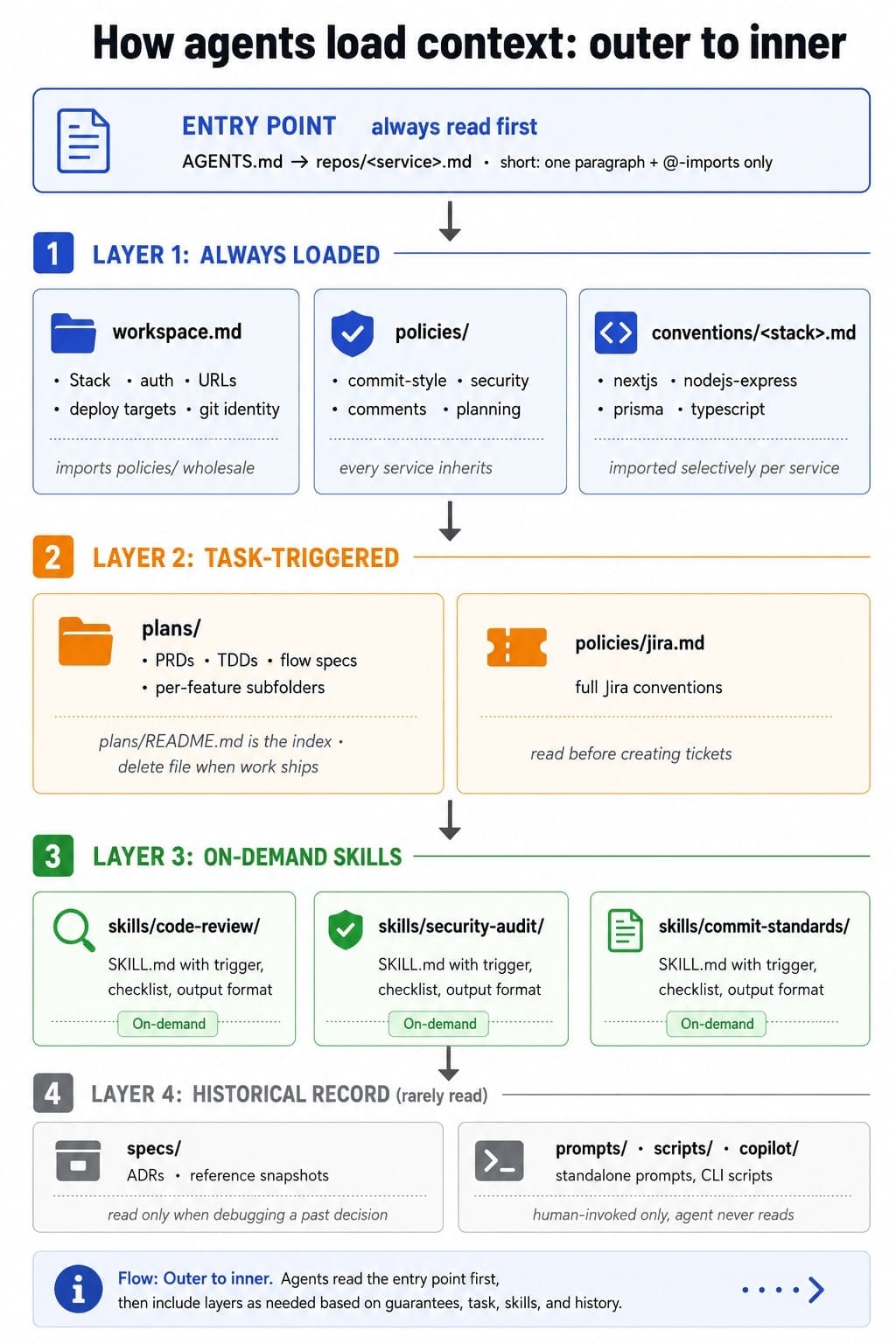
The entry-point file: one per service
Each service gets a file in repos/. Keep it short: one paragraph describing the service, then imports for the layers it needs.
@../workspace.md
@../conventions/nodejs-express.md
@../conventions/prisma.md

## Overview
Payments service. Handles charge initiation, webhook
ingestion from the provider, and refund flows.
Express 5, Prisma on PostgreSQL.
Talks to: auth-service (JWT validation), frontend-app.
The @path syntax is Claude Code's import mechanism. When the agent reads the file, it follows each import and loads the referenced content. Other agents (Cursor, Copilot, Codex) ignore lines they do not understand, so the file still works as plain documentation for them.
The real content lives in the shared layers, and the entry-point file only points to them. When a convention changes, you update one file in conventions/ and every service picks it up.
The plans/ rule
One rule keeps the system clean: when work ships, delete the plan file.
Don't archive it or add a "status: shipped" header. If the decision deserves a record, write a short ADR in specs/ covering what was decided and why, then delete the plan.
Deleting the plan also requires the team to agree the work is actually done, which surfaces incomplete follow-ups before they become undocumented debt.
READMEs as routing tables
Every layer folder should have a README.md that the agent reads first to decide whether to go deeper. List feature areas and file names, and keep it at that.
# Plans

Active work only. Delete when shipped.
Write an ADR in specs/ if the decision needs a record.

## Onboarding redesign
- prd-onboarding-v2.md       - product requirements
- tdd-onboarding-v2.md       - technical design
- onboarding-v2/             - per-flow specs

## Payment gateway migration
- prd-payment-gateway.md     - requirements
- tdd-payment-gateway.md     - technical design
The agent reads this, finds the relevant area, and reads only those files. Without an index it either guesses or reads everything. Thirty lines of README save a lot of unnecessary reads on every task.
How to build this today
Make a new git repo called project-ai-instructions as a sibling of all your service repos. This is the only place AI instructions will live.
Create workspace.md, policies/, conventions/, plans/, skills/, specs/, and repos/. Add a README.md to plans/ and specs/ right away, even if they are empty.
Capture everything true across all services: stack overview, deploy targets, auth approach, URL map, issue tracker project key, git identity per folder. Keep it factual. If something is stack-specific, it belongs in conventions/ instead.
One file per technology: nextjs.md, nodejs-express.md, prisma.md, typescript.md. Each covers patterns, gotchas, and conventions specific to that stack. Services import only what they use.
For each service, create a file in repos/ with a one-paragraph description and the relevant @-imports. Then run link-all.sh to create AGENTS.md and CLAUDE.md symlinks in every service repo. Do this on every machine after cloning.
Take every PRD, TDD, and design doc that is still in progress and move it into plans/. Update the README index. Commit to the delete-on-ship rule from this point forward.
The first time you write a code review checklist or a migration runbook, put it in skills/ with a trigger description. You will reuse it more than you expect, and the agent will invoke it automatically when the task matches.
What you get
Agents load less context per task, which means faster responses and lower token costs.
The bigger payoff comes later, in team habits. Someone has to decide a plan is done before deleting it, and the convention files end up as the standard everyone works from. New engineers read the same docs the agent reads and get oriented faster.
You don't need to do all of this at once. Steps 1 through 5, a central repo with workspace.md, conventions, and wired-up symlinks, give you most of the value. Add plans and skills as you go.
I run this setup across a few full-stack projects, each with a large number of independent service repos. Every project gets its own project-ai-instructions repo sitting as a sibling of its services. I started with instructions scattered across individual repos. Moving everything into one central repo with symlinks is what made it manageable at that scale. The @-import examples use Claude Code syntax, but the folder structure and symlink approach work the same way with Cursor, Copilot, Codex, or any agent that reads project files for context.
Use this with your agent
Copy the prompt below and give it to your AI agent. It will audit your current instruction setup against the structure described in this post and tell you what to move, what to create, and what to delete.
Audit my AI instruction setup against the layered structure described at sahilkapoor.com/the-instruction-layer-your-ai-agents-need/.

The structure has four layers:
1. Always loaded: workspace.md, policies/, conventions/<stack>.md
2. Task-triggered: plans/ (active work only; files deleted when shipped)
3. On-demand skills: skills/<name>/SKILL.md with a trigger description
4. Historical record: specs/ (ADRs and snapshots only, no active work)

Each service repo should have a single entry-point file (AGENTS.md or CLAUDE.md)
that symlinks to repos/<service>.md in a central project-ai-instructions/ repo.
The entry-point file should be short: one paragraph description + @-imports only.
Every layer folder should have a README.md that acts as an index, not documentation.
plans/ files are deleted when work ships. Not archived, not marked done.

Please:
1. List every instruction file you can find and which layer it belongs to.
2. Identify files in the wrong layer (e.g. active specs in specs/, stable rules in plans/).
3. Identify missing pieces (no workspace.md, no README index, no central repo, scattered per-repo files).
4. Give a prioritised action list: what to create, what to move, and what to delete.
Update: Claude Code now reads AGENTS.md
The setup above creates a CLAUDE.md symlink in every repo because Claude Code used to read only CLAUDE.md. That is no longer true. Claude Code now reads AGENTS.md directly, so a repo that only has an AGENTS.md works without a symlink, an import, or a setting.
It is a fallback, not a merge. By default:
- Only
AGENTS.md(noCLAUDE.mdorCLAUDE.local.mdin the working directory or above it): Claude readsAGENTS.md. - Both files: Claude reads
CLAUDE.mdonly. - A
CLAUDE.mdthat imports@AGENTS.md: Claude reads both, withAGENTS.mdpulled in through the import.
The @-imports inside AGENTS.md are expanded the same way, so the entry points in repos/ work unchanged. You need Claude Code v2.1.277 or later.
One thing to watch: a personal CLAUDE.local.md counts as a CLAUDE.md. Add one to a repo that relies on AGENTS.md and Claude stops reading AGENTS.md for you. Setting Project instructions to claude-md-and-agents-md makes Claude read both.
For this layout, the CLAUDE.md symlink is now optional. Keeping it does no harm, since it points at the same file. You can drop the ln -sf AGENTS.md "$dir/CLAUDE.md" line from link-all.sh once everyone on the team is on a recent version.
Source: Claude Code docs, "How Claude remembers your project" (AGENTS.md section)