
What is NVIDIA DGX Spark (and why I bought one)
NVIDIA DGX Spark is a desktop AI supercomputer with 128GB unified memory. Here's what it is, how it compares to a Mac or consumer GPU, and why I bought one to dive deeper into AI.

My MacBook had 16GB of RAM. I was hitting a wall every single time I tried to run a model that actually mattered. Anything worth using, Llama 3 70B, Qwen 32B, DeepSeek, Mistral Large, none of it would load. The models that could fit were the small ones, 7B parameters, quantized down to almost nothing, and the quality showed every time I used them. So I'd give up and go back to paying for ChatGPT, Claude Max, GitHub Copilot separately. Different tools, different subscriptions, all of it adding up. It worked. But I always felt like a guest on someone else's machine.
That feeling kept getting worse as the models got better. The gap between what I could run locally and what actually mattered kept growing, and I was watching it from the outside.
When I first saw the DGX Spark announced I didn't buy it immediately. I sat with it for a few months. But the idea kept pulling me back. You could actually own a piece of AI. Not rent access to it. Own it. While the whole thing is still becoming what it's going to be. That felt like the right kind of bet to make.
So I ordered one.
What is the DGX Spark
The DGX Spark is a desktop AI supercomputer made by NVIDIA. A machine built from the ground up to run AI models, designed to sit on your desk, and powerful enough to run models that previously needed a server room.
The specs
Inside it runs the GB10 Grace Blackwell Superchip, NVIDIA's own CPU and GPU fused together on the same die. Grace handles the CPU work, Blackwell handles the AI compute, and they share the same 128GB memory pool with 1TB/s bandwidth between them. On top of that: 1 PFLOP of FP8 AI performance and 4TB of NVMe storage. These are not consumer specs dressed up in marketing language. This is the same Blackwell architecture sitting in data centers right now, shrunk into a desktop form factor.
The Spark is part of NVIDIA's broader DGX family, which ranges from this desktop machine all the way to full datacenter systems. DGX has always meant serious AI hardware. The Spark is just the first time it has been small enough to order to your house.
The design
The surprising thing about DGX Spark is how unlike an NVIDIA machine it looks. You expect something closer to a graphics card or a compact server, but it has the footprint of a Mac mini: small, desk-friendly, and almost understated.
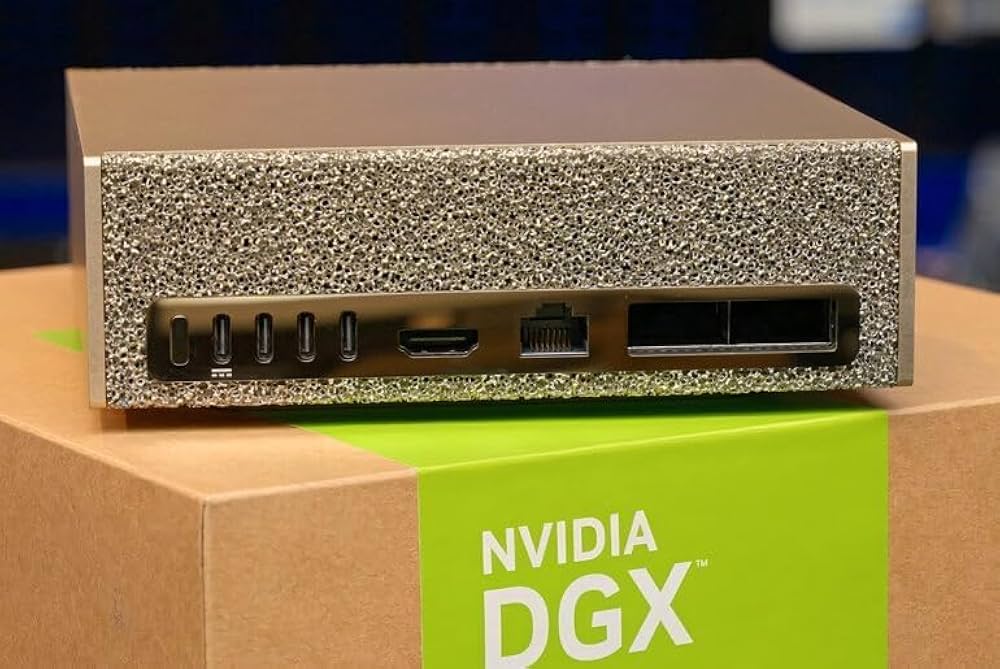
The golden finish and fine perforated metal mesh across the top and sides make it look more like a designed object than a piece of infrastructure. Mine has been sitting next to my monitor for weeks, and most non-tech people who see it have no idea what it is. Some assume it is a speaker or some Apple accessory.
The mesh is not just aesthetic. It is part of how the machine breathes, pulling air through quietly without needing to sound like a server. In daily use, it runs quieter than my MacBook with a few browser tabs open. Pick it up, though, and the density gives it away. It feels solid and heavier than it looks, which is usually the first hint that there is serious hardware inside.
Understanding 128GB unified memory
This is the part that you actually pay for, and it changes what you can do.
In a normal computer, your CPU has system RAM and your GPU has its own separate VRAM. They're connected by a bus and data has to move between them. On a consumer GPU like the RTX 4090, you get 24GB of VRAM. That's your hard ceiling for AI. Whatever doesn't fit in 24GB doesn't run.
Unified memory means the CPU and GPU share one pool. The CPU and GPU share the same physical memory, so there is no bottleneck from moving data between them. Apple pioneered this with Apple Silicon and it's why Macs became popular for local AI. A Mac with 64GB gives you 64GB for models.
The DGX Spark has 128GB of that same unified pool, but with NVIDIA's GPU architecture underneath it. An 80GB model loads and still leaves room for a 256,000 token context window, the OS, everything else running alongside it. Nothing squeezed. Nothing compromised. On my 16GB MacBook that same model wouldn't even open.
128GB unified memory is the reason the Spark is a different category, not just a more expensive Mac.
What you can actually do with it
First thing I did was load Qwen3-Coder-Next. 80GB model. Full version, no compression. It just loaded.
I had been running 7B models on my MacBook for months. Telling myself they were good enough. They weren't. You don't realise how much you were missing until something better shows you. The quality difference is obvious. The consistency. The way it handles long context.
The MacBook is still around. I use it as the screen ssh'd into DGX. The Spark does the thinking.
Since then I have been testing everything I could not do before:
- Train and fine-tune on your own data: fine-tune on your codebase, your writing, your company's internal knowledge. On cloud GPUs that's an expensive experiment. On the Spark it's an overnight job.
- Multi-agent workflows: run multiple models in parallel, each with a role. One reviewing, one writing, one searching. 128GB means you're not fighting for memory between them.
- Build an agent team: I'm building NemoClaw/OpenClaw, a team of AI agents that run entirely on the Spark. Each agent has context, memory, tools. No API costs, no third-party limits.
- Always-on private API: the Spark runs 24/7. Every device hits it over Tailscale. Your own private OpenAI-compatible endpoint.
- Chat from your phone: Open WebUI runs on the Spark. Access it from anywhere over Tailscale, same as ChatGPT.
Also: image generation with FLUX, RAG pipelines, embeddings, Whisper transcription, 256K context for entire codebases. The list keeps growing.
Software bundled with DGX
The hardware is only one part of it. NVIDIA also ships a set of free tools that make a lot of this easier.
- AI Workbench: a free local IDE for managing AI projects, environments, and models. Connects to NGC and your local GPU out of the box.
- NeMo: open source framework for training and fine-tuning LLMs. This is what serious model work on the Spark looks like.
- NIM (Inference Microservices): pre-optimized containers for running models. Drop one in and it runs, already tuned for the hardware.
NGC container registry, TensorRT, Triton Inference Server, RAPIDS. All free, all local.
What's next
I want to run NemoClaw/OpenClaw agents at full speed with complete privacy. Train my own models on my own data. Experiment without watching a cost meter. That is the actual reason.
Owning a piece of AI while it is still evolving feels different from renting access to it forever. Not cheap, but what it bought is a machine that is mine, running models I choose, no rate limits, no one else's terms.
I have at least a dozen more things I want to try. Fine-tuning on my own codebases, multi-agent pipelines with NeMo, pushing the context window to its actual limits, running FLUX properly. The list keeps growing. But I wanted to get this post out first, because the hardware alone is worth talking about. This thing is genuinely fun to own.
Next up: how I actually set this up. Two machines, Tailscale, VS Code Insiders, getting a local model working inside Copilot, and a few things that broke badly before any of it clicked.